How to Keep Your Phone Alive in the Woods (And Other Off-Grid Power Tricks)
You are miles from the nearest outlet, the sun is dipping below the trees, and you reach for your phone only to see the screen go black. That dead battery...
How to Keep Your Phone Alive in the Woods (And Other Off-Grid Power Tricks)
You are miles from the nearest outlet, the sun is dipping below the trees, and you reach for your phone only to see the screen go black. That dead battery panic is a quick way to ruin a great trip, especially when you really need a trail map or a quick photo of the sunset. It is a common frustration, but it doesn't have to be part of your next adventure.
Modern camping often requires a bit of juice, but you don't need to be a tech expert to stay powered up. Using the right Outdoor Hacks And Tricks can keep your devices running for days without a wall plug. From simple solar charging hacks to clever off-grid electricity tricks, a little bit of planning goes a long way toward charging your phone while camping safely and efficiently.
This guide breaks down power bank efficiency tips and solar panel optimization so you never have to worry about a dark screen again. We'll cover how to prep your gear before you leave and which hidden settings to change to save every last drop of energy. Let's look at how you can stay connected while enjoying the great outdoors.
The Pre-Trip Power Play: Why Your Drive Matters
Think about the last time you headed out for a trip. You probably unplugged your phone from the wall, tossed it in the center console, and hit the road. But here is the thing: that drive is actually your most valuable charging window. Since many camping trips happen within a two or three-hour radius from home, you have a prime opportunity to arrive at the trailhead with every single cell full.
We call this the 'Top-Off' rule. There is a huge difference between being at 100% when you leave your kitchen and being at 100% when you finally step onto the dirt. During that drive, your phone is likely running GPS and music, which drains the battery before you even lock the car. If you arrive with 85% battery, you are already starting at a disadvantage. Proactive power management is always more effective than trying to save a dying battery later.
The real move here is focusing on your power banks during the commute. While your phone is easily topped off, those high-capacity bricks take much longer to fill. Use the car’s juice to replenish your energy reservoir while you still have an engine running. This provides a safety net for the rest of the trip, especially since portable solar panels can be fickle if the weather turns cloudy or you are under a thick canopy of trees.
Not all car ports are created equal, though. You might notice your phone barely gains a charge when plugged into the built-in USB slot. That is because most factory-installed ports are designed for data transfer, not high-speed charging. They often provide a fraction of the power you get from a standard wall outlet, making them feel painfully slow when you are on a timeline.
To make the most of your drive, use a dedicated 12V adapter that supports fast charging to maximize your vehicle's output. Also, remember that once you lose service, your phone works overtime searching for a signal. This search consumes a massive amount of power. Flipping into airplane mode the moment the bars drop can save your battery for when you actually need to snap a photo or check the map.
Key insights:
Arriving at the trailhead with 100% battery is more critical than leaving home with a full charge.
Vehicle USB ports are often slower than wall plugs; use a 12V fast-charge adapter to maximize efficiency.
Prioritize charging high-capacity power banks during the drive because they take much longer to fill than phones.
Enable airplane mode as soon as cell service becomes spotty to prevent the device from draining energy while searching for a signal.
The 3-Hour Window
Most camping trips happen within a two or three-hour drive from home. This is your final countdown for power. While you’re driving, your dashboard acts as a mobile charging station. It’s the best time to top off your phone and power bank before you hit the dirt.
But here is a catch: your car’s built-in USB port is usually much slower than a wall plug. These ports are often meant for data transfer, not high-speed charging. If you want to arrive with a full battery, use a high-output 12V adapter instead. It makes a huge difference.
Also, don’t wait until you’re in the woods to save power. Your phone drains battery fast by searching for cell signals in remote areas. Flip on airplane mode the moment you leave. It’s way easier to keep a full battery than to try and revive a dead one later.
Key insights:
Use a 12V cigarette lighter adapter for faster charging than built-in USB ports.
Enable airplane mode as soon as you leave to prevent battery drain from signal searching.
Solar Panel Secrets: Getting More Juice From the Sun
You finally bought a portable solar panel for your next trip, but you might be surprised by how little power it actually generates if you just strap it to your bag and go. Here is the reality: portable solar is not a set it and forget it tool. Unlike the panels on a house, these smaller versions are optimized for movement but deliver much less electricity. If you expect them to work like a wall outlet without any effort, you are going to be disappointed when your screen stays dark after hours of hiking.
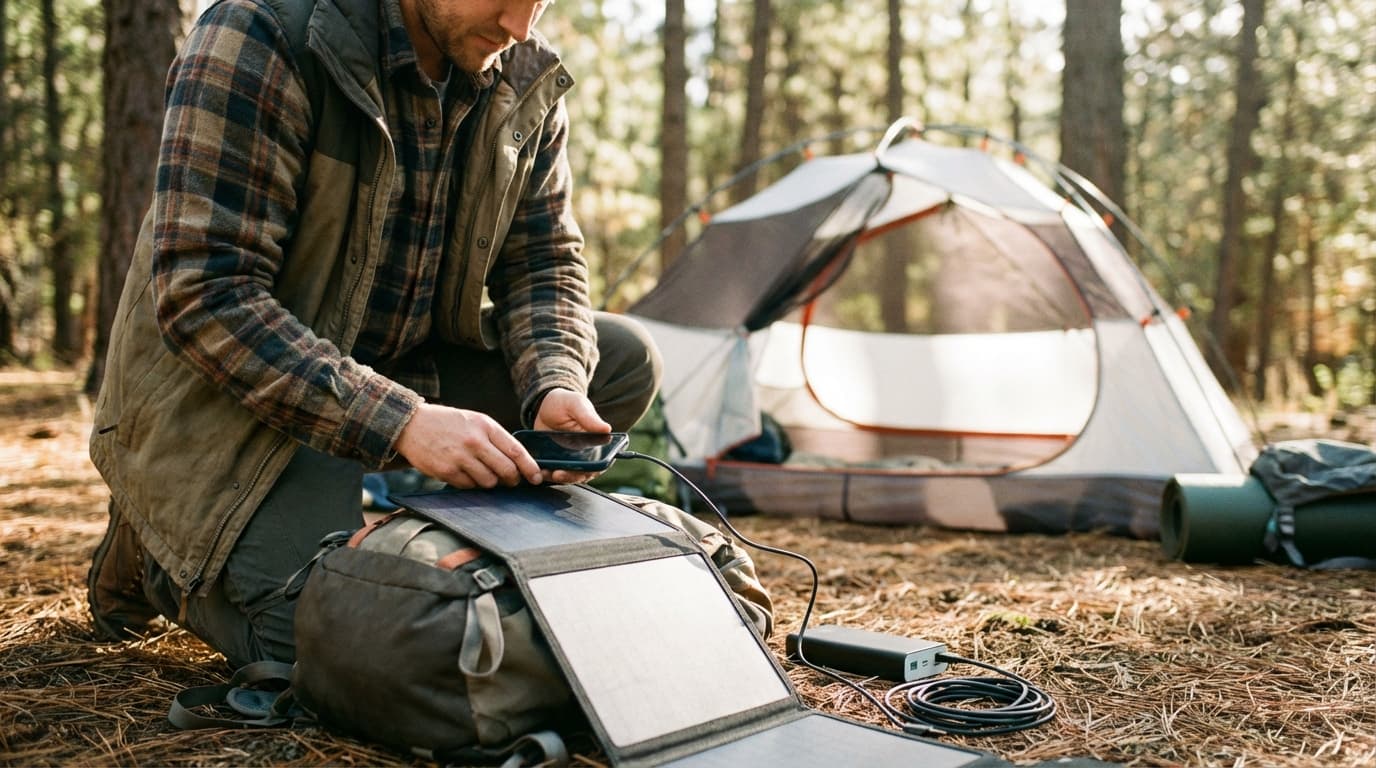
One of the biggest mistakes people make is plugging their phone directly into the panel. Here is a better way: use a power bank as an intermediary. Why does this matter? Phones are sensitive. If a cloud passes or you walk under a tree, the power flow drops. Your phone might stop charging and then fail to start again when the sun comes back. A power bank acts as a steady reservoir that takes whatever juice the panel gives it without complaining. Plus, it lets you keep your phone with you for photos while the battery stays in the sun.
You also need to respect the physics of light. Even a little bit of shade on one corner of the panel can tank the output of the whole unit. Portable panels are great for van life or remote work in National Parks, but they need clear skies to perform. If you are in a thick forest, you are better off relying on proactive power management. Turn on airplane mode the second you lose service because your phone drains a ton of battery searching for a signal that is not there.
When you are on the move, the best spot for your panel is hanging from the brain or the top pocket of your backpack. This keeps it flat and facing the sky while you walk. But watch out for the heat. Panels get hot when they soak up rays, and heat is the enemy of lithium-ion batteries. Make sure your power bank or phone stays tucked away in a shaded pocket or under a flap so it does not cook while it charges. It is about keeping the gear safe while you harvest the energy.
To get the most juice possible, remember the 90-degree rule. Your panel should be perpendicular to the sun to catch the most direct rays. If the sun is low in the morning, prop the panel up instead of laying it flat on the ground. A quick adjustment every hour or two as the sun moves across the sky makes a massive difference in how much energy you actually capture. It is a small effort that pays off with a full battery by campfire time.
Think about your gear as a whole system. Multi-functional items like lanterns that double as power banks are worth their weight in gold because they serve as emergency reserves. If you use your headlamp on red-light mode, you save even more energy for your phone later. As Casey McDevitt from EnergySage points out, these panels offer sustainable power beyond the reach of traditional outlets, but they require a little bit of human insight to work at their best.
Key insights:
Always use a power bank as a buffer between your solar panel and your phone to ensure a steady charge.
Position your panel at a 90-degree angle to the sun and adjust it every few hours to maximize efficiency.
Keep your charging devices in the shade while the panel is in the sun to prevent battery damage from heat.
Enable airplane mode and low-power settings immediately upon starting your trip to conserve energy proactively.
The Backpack Mount Strategy
Ever wonder why your phone dies so fast in the woods? It is usually because it's working overtime searching for a signal that isn't there. If you are moving, the best way to keep it topped off is by hanging your portable solar panel from the 'brain' - the top pocket - of your backpack. This gives you the best angle for sun exposure while you hike. Just keep in mind that portable panels aren't quite as powerful as the ones on a house roof, and their efficiency drops the moment you step into a shady forest.
Here is the tricky part: solar panels need heat and light to work, but batteries hate both. If you plug your phone directly into a panel sitting in the sun, you risk overheating the battery. Instead, try using a power bank as a middleman. Tuck the battery inside a cool, shaded pocket of your pack while the panel hangs outside. This keeps your phone safe and gives you a steady energy reservoir even when clouds roll in. Also, remember to flip on Airplane Mode the second you lose service so your phone stops wasting juice on a hopeless search for bars.
Key insights:
Using a power bank as a buffer protects your phone from direct sun heat and provides a steady charge during intermittent cloud cover.
Proactive energy management, like enabling power-saving mode at the start of your hike, is far more effective than reactive saving.
Angle Matters More Than You Think
Ever wonder why your solar panel feels like it is barely working on a bright day? It usually comes down to the angle. To get the most juice, your panel needs to sit at a perfect 90-degree angle to the sun. Even a small tilt away from direct light can slash your power output. Portable panels are built for the trail, but they lack the raw strength of rooftop setups, so alignment is everything.
Here is a trick: use a power bank as a middleman instead of plugging your phone in directly. This creates a steady energy reservoir that keeps filling even when a cloud passes or you step into the shade. If you are on the move, you can hang the panel from your pack brain, but keep in mind that hiking through trees will tank your charging speed because those panels need clear skies to thrive.
Think of it as a game of follow-the-leader. As the sun moves across the sky, take a second to pivot your setup every hour. These small shifts make sure you are actually gathering power instead of just carrying extra weight for no reason. It only takes a second, but it makes a world of difference for your battery bar.
Key insights:
The 90-degree rule is the gold standard for portable solar efficiency.
Charging a power bank instead of a phone directly creates a more stable energy reservoir.
Small, frequent adjustments to the panel's position are better than a 'set it and forget it' approach.
Stretching Your Battery: Software Tweaks for the Wild
Ever noticed how your phone battery disappears faster when you are miles from civilization? It is not your imagination. The biggest drain in the woods is the constant search for a signal that does not exist. When your phone hits 'No Service,' it works harder, cranking up the power to find a tower and effectively cooking the battery. Most people wait until they see that 20% warning to start worrying, but by then, the battle is mostly lost. Proactive saving is the only real strategy. You need to lock down settings the moment you hit the trailhead, not when you are frantically trying to preserve those last few drops of juice.
The best move you can make is switching to Airplane Mode immediately. Since phones consume a massive amount of energy trying to stay connected in remote areas, cutting that link saves a huge chunk of power. You can still keep your GPS active to stay on track, but you stop the background drain of apps trying to fetch data. Using offline maps is the perfect partner for this trick. If you download your route before leaving home, your phone stays useful without needing a single bar of service. It turns your device into a dedicated navigation tool rather than a struggling searchlight for cell towers.
This logic applies to your other gear too. For instance, using your headlamp's red-light mode does more than just protect your night vision. Red light uses significantly less power than high-brightness white settings, which keeps your batteries alive longer. If you have a lantern that doubles as a power bank, like the UCO Rhody+, every bit of energy saved on lighting is juice you can put back into your phone later. As the saying goes, everything you bring needs to be worth its weight in gold. Choosing the low-red setting is a small tweak that ensures your gear stays functional until you are back at the car.
Key insights:
Enable Airplane Mode immediately in low-service areas to stop the battery-draining search for towers.
Download maps for offline use to maintain navigation without consuming mobile data.
Switch headlamps to red-light mode to save power while preserving night vision.
Airplane Mode Is Your Best Friend
You have likely noticed your phone battery plummeting the moment you step onto a remote trail. It is not just the photos; your device is working overtime. When you are out of range, your phone constantly scans for a signal, burning power to find a cell tower that is not there. This search is a massive battery drain.
The fix is simple: flip on airplane mode the second you lose service. Proactive management is much better than trying to save a dying battery at 20%. By stopping that search, you make the most impactful adjustment possible for your battery life. It keeps your phone ready for when you actually need it.
You can still stay found by using offline maps. Your phone's GPS works in airplane mode, letting you track your location without using cellular data. Think of it this way: every bit of energy you save now is power you can use for safety later.
Key insights:
Switching to airplane mode immediately upon entering low-service areas is more effective than reactive power-saving.
Offline maps allow for full GPS functionality without the energy cost of searching for cellular towers.
The Red Light Advantage
You finally reach camp and need to find your gear in the dark. Most hikers click their headlamp straight to the brightest white setting, but switching to red-light mode is a much smarter move. It is not just about protecting your night vision so you can still see the stars.
The reality is that red-light settings use significantly less power than high-brightness white beams. Using this mode is a simple way to practice proactive power management. Instead of waiting for a low-battery warning, you are saving energy from the start.
This small change keeps your light running for days longer. It also means you won't need to drain your portable power bank to recharge your lamp quite as often. When you are off the grid, every bit of saved energy counts.
Key insights:
Red-light mode extends battery life by using less energy than high-white beams.
Preserving night vision makes it easier to navigate camp without blinding your friends.
Proactive energy saving is more effective than trying to recover a dead battery later.
Gear That Pulls Double Duty
When you're miles from the nearest outlet, every ounce in your pack starts to feel like a heavy brick by mile ten. This is exactly why seasoned hikers live by the weight in gold rule for their electronics. If a piece of gear only does one thing, it's taking up precious space that could be used for something more versatile. Think about it this way. Why carry a heavy lantern and a separate power bank when you can have one sleek device that handles both?
We're seeing a massive shift toward camping essentials that work harder for you, like stoves that generate electricity from heat and lanterns with integrated USB ports. These aren't just fancy gadgets. They're your safety net. For instance, your phone consumes a huge amount of battery just by searching for a cell signal in the woods. While switching to airplane mode helps, having a stove that tops off your charge while you boil water for coffee is a total game-changer.
The reality is that integrated power solutions are becoming the new standard for outdoor life. Modern grills, fans, and even tent lights now serve as emergency power reserves. This matters because it turns your basic campsite setup into a functional mini power grid. Instead of constantly checking your battery percentage with a sense of dread, you're using gear that works for you in two ways at once. It's about making sure your gear is as tough and multi-talented as you are out on the trail. This approach keeps your pack light and your electronics ready for anything nature throws your way.
When you're picking out a light, look for utility and weight balance in gear like the UCO Rhody+. It's a great lantern for the tent, but the real win is that it doubles as a backup battery. Here's a smart trick. Use the red-light mode whenever possible. It uses significantly less power than the high-brightness white settings, which keeps that extra juice available for your phone if things go sideways.
Your backup light should always be your backup battery. If your primary headlamp fails, you want your secondary light to be more than just a weak glow. It needs to be the thing that keeps your GPS or emergency contact device running. Choosing gear that pulls double duty isn't just about saving weight. It's about building a smarter and safer kit that won't leave you in the dark when you need power the most.
Key insights:
Switch to airplane mode immediately in low-service areas to stop your phone from hunting for signals and draining the battery.
Prioritize gear with integrated USB ports to turn everyday camp items into emergency power reservoirs.
Use the red-light setting on headlamps and lanterns to conserve internal battery life for critical charging needs.
Choosing Multi-Functional Lights
When you’re packing for the woods, every ounce feels heavy. You want to stay light, but you also need to keep your phone alive for photos or emergencies. This is where dual-purpose gear helps. Instead of packing a separate power bank and a lantern, bring one tool that does both jobs at once.
Take the UCO Rhody+ as a great example. It provides plenty of light for your tent while doubling as a backup battery. Everything you bring should be worth its weight, and a light that charges your gear fits that perfectly. It’s a smart way to save space since many modern camping essentials now include USB ports.
Also, remember that small choices add up. Using red-light mode on your headlamp uses way less power than bright white settings. By switching to red light and using airplane mode, you stretch your power further. This leaves more energy in your light for when you really need a phone charge.
The New Frontier: Working From the Woods
Ever thought about swapping your cubicle for a pine forest? The National Park Office is a real thing now, and it is growing fast. But here is the catch: your laptop is a power-hungry beast compared to your phone. While a small pocket bank is fine for a quick phone boost, serious remote work in the woods requires high-capacity power stations. These units are basically giant batteries that can keep a laptop humming for days. Since many trips start just a few hours from home, use that drive for one final charge before you lose the safety net of a wall outlet.
Keeping gear alive is about being smart with what you have. Your phone drains battery fast searching for signals in deep valleys, so flip it into Airplane Mode the moment you lose service. Proactive management is key. Turn on power-saving mode at the very start of your trip, not when you hit twenty percent. If you use solar panels, do not plug your phone directly into them. Instead, charge a power bank first. This creates a steady energy reservoir that handles passing clouds much better than your sensitive electronics can.
Temperature is the silent killer for outdoor tech. Lithium-ion batteries hate extreme heat and freezing nights. Keep your devices in the shade during the day or tucked inside a sleeping bag at night to maintain their health. Also, look for gear that does double duty. A lantern that acts as a backup battery is incredibly useful. Every ounce matters when your office is miles from the nearest road, so make sure every piece of gear is worth its weight.
Key insights:
Enable power-saving mode and airplane mode as soon as you leave to prevent unnecessary drain.
Use a power bank as a buffer for solar charging to protect devices from energy fluctuations.
Insulate your electronics in a sleeping bag during cold nights to preserve battery life.
Prioritize multi-functional gear like lanterns with integrated USB output ports.
Common Questions About Off-Grid Power
Ever wonder why your phone battery hits zero way faster in the woods than at home? It is usually because your device is working overtime. When you are out of service range, your phone constantly hunts for a cell connection, and that search burns through power. To stop the drain, switch to airplane mode the second you lose bars. Also, think about your travel time. Most people camp within a three hour drive from home, so use that window for one last full charge before you step out of the car.
If your gear refuses to charge, the problem might be your solar setup. Portable panels are built for travel, but they deliver less electricity than the big ones on a house roof. A common mistake is plugging a phone directly into a panel. It is much better to use a power bank as a middleman. The bank acts as a reservoir, collecting energy even when clouds pass by, while you keep your phone free for photos. If you are hiking, try hanging the panel from the top pocket of your pack to catch the sun while you move.
Troubleshooting often comes down to small adjustments. For instance, using the red-light mode on your headlamp uses way less power than the high-brightness white setting. Also, look for gear that does two jobs at once. A lantern that doubles as a backup battery is worth its weight in gold. The real trick is being proactive. Start your power-saving modes at the beginning of the trip when you have a full battery instead of waiting until you are at twenty percent. This simple shift keeps your tech alive much longer.
Key insights:
Use a power bank as a buffer between solar panels and your phone for a more stable charge.
Enable power-saving settings the moment you start your trip rather than waiting for a low battery warning.
Choose dual-purpose gear like lanterns with USB ports to reduce the total weight of your kit.
Frequently Asked Questions
It happens because your phone is working overtime to find a signal. When you are in an area with no service, your device constantly searches for a cell connection, and that process uses a huge amount of battery power.
The best trick is to be proactive. Flip your phone into airplane mode as soon as you notice the bars disappearing. It is much more effective to save that energy at the start of your trip than trying to scramble for power once your battery hits twenty percent.
Actually, it is usually better to use a power bank as a middleman. Portable solar panels are great, but the energy they put out can be inconsistent if a cloud passes by or if you are walking through a shady forest.
If you charge a battery pack first, it acts as a steady reservoir of power for your devices. This also means you can keep your phone in your pocket for photos while the solar panel stays strapped to your backpack catching rays. It is a much more efficient way to manage your off-grid electricity.
It really does. While it doesn't technically drain the power away, the cold makes it much harder for the battery to release its energy. You might see your phone drop from 40 percent to zero in minutes if it gets too chilly.
The best trick is to keep your power bank and phone inside your jacket or at the bottom of your sleeping bag at night. Your body heat keeps the chemistry working so you don't wake up to a dead device when you need it most.
Rain and charging don't mix well, so you have to be a bit strategic. If you're using a solar panel, try hanging it from the top pocket or the brain of your backpack while you hike. This keeps the panel out in the sun while your power bank stays tucked away in a waterproof pocket.
Also, it is usually better to charge a power bank in the sun instead of your phone directly. That way, you can keep your phone safe and dry inside your tent while the bank does the heavy lifting outside. This also protects your phone from overheating in direct sunlight.
When you are out in the woods, your phone works overtime trying to find a cell signal. It constantly searches for a tower, and that search burns through battery power fast even if you aren't using the screen.
The simplest fix is to turn on airplane mode the second you lose service. You can still use your camera to take photos, but you will save a massive amount of power for when you actually need to make a call later on.
Actually, it is usually better to charge a power bank first. Solar power can be a bit inconsistent because of passing clouds or trees, and phones don't always handle those power dips very well.
If you charge a battery pack instead, it acts as a reservoir. It collects the energy steadily, and then you can charge your phone from the pack with a stable connection later on. Plus, it means you can keep your phone with you while the panel sits out in the sun.
Conclusion
So what is the secret to keeping your tech alive while you are out in the wild? It is not just about having the biggest battery pack you can find. It is about combining a few smart outdoor hacks and tricks, like topping off your gear during the drive and using solar charging hacks when the sun is high. When you pair those hardware moves with simple software tweaks like airplane mode, you stop fighting your battery and start enjoying the view.
Think of your power supply like your water stash: you want to keep it full rather than trying to find more when you are already thirsty. Being proactive means you can actually relax and maybe even get some work done from a beautiful national park without that low battery panic creeping in. It turns your phone back into a tool for safety and photos instead of a source of stress.
For your next trip, pick just one or two of these off-grid electricity tricks to try out. Maybe you finally mount that solar panel to your pack or switch to red-light mode at night to save some juice. Staying powered up does not have to be a chore, and it definitely should not get in the way of your adventure. Now go pack your bags, grab your power bank, and have a great time.
Every WilderReady guide is researched, written, and fact-checked in-house against trusted references such as the American Red Cross, the National Park Service, and the CDC before it goes live. We publish under this shared byline instead of invented personas, so you always know who stands behind the guidance you are reading.